Techpill - Tech Tips, News And More: blackberry

Hot

Post Top Ad

Showing posts with label blackberry. Show all posts

Saturday, 19 March 2016

Facebook App Will Be Discontinued On Blackberry By March 2016: What You Need To Do

13:38 0
This is another timely blow on blackberry inc, last week whatapp discontinue their support on Nokia and blackberry devices including the BB10. Now Facebook has just announced that it Facebook App will be discontinued on blackberry by march 31st 2016 to be precise. According to Facebook, the Facebook App will be discontinued and replaced with a web version. In response to this, blackberry in their official blog issue a statement below:


facebook discontinue service on blackberry

 "The app landscape continues to evolve, and in ways that are not always within our control. Recently, Facebook made the decision to discontinue support of their essential APIs for BlackBerry and WhatsApp announced they would end support for BlackBerry 10 and BBOS at the end of 2016. We are extremely disappointed in their decision as we know so many users love these apps. We fought back to work with WhatsApp and Facebook to change their minds, but at this time, their decision stands (but let them know how you feel on social media, using the hashtag #ILoveBB10Apps). Despite this, we have worked hard to ensure our end users have the best experience in light of this decision, and are continuing to search for alternate solutions..."
Few hours after this announcement Facebook roll out an update for blackberry devices, please DO NOT update your Facebook app, this will only remove the Facebook app and replace it with the web version. But if you have already been trick by updating it, simply restore your backup of Facebook application or restore your device to the initial and you’ll have the pre-install Facebook app back.

This is a remarkable blow on Blackberry, do you think they will survive this?

 If you really love your blackberry use an hash tag #ILOVEBB10Apps on social media, to express yourself.

Share This: Let your friends know what you just read by using the share button below.


Read More

Wednesday, 30 September 2015

Blackberry Releases First Official Images On New Android Phone

09:46 0
Blackberry release the official image of their first android called blackberry Priv. The word "Priv" means privacy; for those that love privacy and security to the extreme on their device. 

This is not the regular BB10 phone base on ios but this is the Android version. this shows that blackberry has now submitted to pressure of their fan by  being on the world most popular Android OS version. Main looking at the image you will noticed is kind of similar to the image leaks few months ago following the rumor about the release of this beast. The release has been schedule for the end of this year.

blackberry priv

Because it’s Powered By Android, PRIV will also deliver the largest choice in apps and the most secure experience possible to the widest audience. PRIV users will enjoy choice, innovation, security, privacy AND productivity. In other words, no compromises.

blackberry priv

blackberry priv side

 With the curve edge it remind me of Samsung galaxy S6 edge don't you think?


Never miss any of my future post CLICK HERE TO SUBSCRIBE Once entered, you will have to check your Inbox for a confirmation email containing a confirmation link. Once you VERIFY your email by clicking on the confirmation link in the message, you will never miss any future articles. 

Like US on Facebook Click Here

kindly share this by clicking on any of the share button below and also we love comments
Read More

Tuesday, 18 August 2015

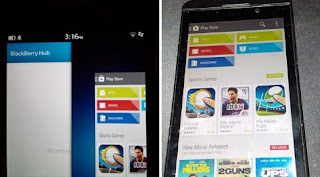
How To Install Google Play Store On BlackBerry Z10 Smartphone

02:28 0


With this method you don't need to sideload the APK files before you can run and enjoy it on your BB Z10 device, Just follow this easiest way to install Google Play Store on your Blackberry Z10 device and enjoy all the android app and game on your blackberry. So you don't need to ask the following Question:

  • how to install apk apps or game on blackberry?
  • how to install google play store on blackberry?
  •  how to use android platform on blackberry
This post will answer all the above question and more. without wasting much of your time below is the procedure.
To Install Google Play On BlackBerry Z10
First of all you need to download the following apk files on your BlackBerry using any browser.

    Google Play Store 5.7.6
    Blackberry Google ID 2.1.1
    Google Account Manager 4.3.2

Installation Process
* After downloading, the names would be; 
       1. com.google.android.gsf.login,
       2. cobalt.backberry.googleID,
       3. com.android.vending.

* Intall and run com.google.android.gsf.login, then login with your Google account information.
* Install and run cobalt.backberry.googleID, and register your device with Google Play.
* Close the two apps above and proceed to the next step.
* Install and run com.android.vending to start enjoying Google Play Store!

Note: The method works with all Blackberry devices running OS 10.3 and better. OS 10.2.x is not supported.

Other Points to Note
All three apps must remain on your BlackBerry Z10 device. Google Play may stop working if any of the apps missed.
Play Store works with all Blackberry devices running OS 10.3 and better. OS 10.2.x is not supported.z

Now that you have successfully injected Play Store on your BlackBerry device, you would be able to use the service like every other Android user. You can;

* Browse and download your favorite apps, games, movies, music or books
* Automatic download and installation of game data (obb files), no manual copying required
* Downloaded apk files (free and purchased) are saved in device/downloads folder
* Buy apps, books, music or movies directly from your Blackberry device
* Support for your preferred payment method: Credit card, prepaid card or PayPal
* Support for in-app purchasing: Buy gems, upgrades or unlocks for your app
* Support for paid subscriptions (monthly/yearly/other)
* Get refund for paid apps (if supported by developer) and many more.

Also Read: Download Files from YouTube, Facebook, Vimeo, VK.com In One Click
  
Never miss any of my future post CLICK HERE TO SUBSCRIBE Once entered, you will have to check your Inbox for a confirmation email containing a confirmation link. Once you VERIFY your email by clicking on the confirmation link in the message, you will never miss any future articles.

Image result for facebook like
kindly share this by clicking on any of the share button below and also we love comment, should incase you have difficulty in doing this notify us in the comment box below.
Read More

Sunday, 5 July 2015

Get Free MTN N120,000 Min And 10GB To Call And Browse Unlimitedly

01:14 2
Hmmm! did i hear you say wow? well you can say that thousand times, because that was exactly what i say when it worked for me! without saying much just follow this procedure to get it done.


What You Need
  • MTN New Sim (That is never been used to receive any MB/GB)
  • Nokia Touch light or any Phone that can't browse
How To Activate
  • Insert MTN New Sim in any of the stated phone above
  • Text GM1000 to 131 on a New sim 
Method 2
well you can use this method to get Mtn 10GB data Free and also 120k free minute
  1. Dial *123*2*5*1# for #120,000 + 10Gig only on new sim
  2. Also*112# for 70gb
Dial *559# for balance

Walla! its that simple. You should receive the message above in the screenshot if it work for you

NB: This is exclusively for Techpill.net visitor, you can't find it else where!


Never miss any of my future post CLICK HERE TO SUBSCRIBE Once entered, you will have to check your Inbox for a confirmation email containing a confirmation link. Once you VERIFY your email by clicking on the confirmation link in the message, you will never miss any future articles.
Also follow on Facebook with our fan page Here

kindly share this by clicking on any of the share button below and also we love comment, should incase you have difficulty in doing this notify us in the comment box below.
Read More

Get Mtn Free 7.5Gigabytes Now (No Tweak Needed)

00:26 0
Wow its my pleasure to introduce this wonderful cheat to you from MTN Where you get 7.5Gb on your sim to browse on all platform be it pc or mobile. The procedure is simple you dont need to tweak your IMEI. just follow the procedure below


What You Need 
  • MTN New Sim (That is never been used to receive any MB/GB)
  • Nokia Touch light or old small Tecno phone
Here is how it works
  • Insert MTN New Sim in any of the stated phone above
  • Text 101 to 131
So simply as that, if your sim work for it, you should receive a successful message as shown in the above screenshot.

To check your Gigabytes balance and the validity date, text 2 to 131
Enjoy it while it last.


Never miss any of my future post CLICK HERE TO SUBSCRIBE Once entered, you will have to check your Inbox for a confirmation email containing a confirmation link. Once you VERIFY your email by clicking on the confirmation link in the message, you will never miss any future articles.
Also follow on Facebook with our fan page Here

kindly share this by clicking on any of the share button below and also we love comment, should incase you have difficulty in doing this notify us in the comment box below.
Read More

Sunday, 28 June 2015

Browse Free On MTN With N0.00

01:12 0
Browse free with N0.00 on your phone, pc and any other gadget with zero amount. Naij.com, an online news site, is helping to bring free mobile internet to Nigerians via the MTN network and the Opera software application. MTN users will be able to activate their free day of internet through Opera Mini on the MTN network. Which means you have access to browse for free with N0.00. No subscription or tweak required. What you need is to follow steps below accordingly and you are good to enjoying free Mtn browsing on your Smartphones or PC.


To Activate Your Free Browsing
1. Visit www.opera.com/mobile/mini to download the latest Opera Mini web browser or get it from Play Store Here 
2. With your Opera Mini visit http://webpass.opera.com/
Then you can start enjoying your free browsing.

To Make it Work With all Apps
That one will involve tweak 

1. Download SimpleServer Android version here
2. Create a new APN settings on your phone as follows.
» Proxy: 127.0.0.1
» Port: 8080
» APN: web.gprs.mtnnigeria.net
» Save And Activate it as your default settings

Configure Your SimpleServer as Follow:
» Pproxy host: 10.199.212.2
» Proxy Port: 8080
» Injection Method: get
» Injection querry/url: http://server4.operamini.com
» Injection Host: server4.operamini.com
» Injection line: press your enter key 4times
» Log level: debug4.

Close the settings and click the connect button.
Use Auto proxy to power all apps

How To Use it on PC Via SimpleServer
1. Download SS PC version here
2. Extract the zip file to a new folder on your desktop background.
3. Open SimpleServer.ini and set it as follow;

LHOST = '127.0.0.1'
IMETHOD = 0
ISPLIT = 0
RHTTP = 0
TIMEOUT = 60
PHOST = '010.199.212.002'
RQUERY = ''
RPATH = 0
PTYPE = 0
KEEP = ''
BQUERY = ''
MQUERY = ''
RHTTPS = 1
PPORT = 8080
LPORT = 8080
VALHDR0 = 'server4.operamini.com'
VALHDR1 = ''
VALHDR2 = ''
VALHDR3 = ''
IQUERY = 'server4.operamini.com'
ADMODE = 0
CQUERY = ''
CUSHDR2 = ''
CUSHDR3 = ''
CUSHDR0 = 'Proxy'
CUSHDR1 = ''
ILINE = 0
FQUERY = ''
SBUFF = 1024
RPORT = 0

4. Save the file and RUN SimpleServer.exe

Caution: It is advisable to use it with N0.00, otherwise MTN may wipe your credit balance.

Never miss any of my future post CLICK HERE TO SUBSCRIBE Once entered, you will have to check your Inbox for a confirmation email containing a confirmation link. Once you VERIFY your email by clicking on the confirmation link in the message, you will never miss any future articles.
Also follow on Facebook with our fan page Here

kindly share this by clicking on any of the share button below and also we love comment, should incase you have difficulty in doing this notify us in the comment box below.
Read More

Wednesday, 3 June 2015

Get MTN BBC Unlimited Monthly Subscription with Just N50

18:05 0
Wow! it been long i post a thread about blackberry for techpill blackberry user. And lot of blackberry user begin to wonder when they will be able to get their own tricks. well it my pleasure to introduce you to this very trick on how to subscribe blackberry complete also know as "BBC" with just N50 naira! sure you heard me right! i said N50 naira instead of normal N1000. 


That means you save N950. isn't that wonderful? You right. Just follow this procedure and get it done and working on your phone without wasting your time. Blackberry Users, use the method below to get it done.


Note: This is exclusively for blackberry user only.
  • Make sure you have at-least N50 on your MTN Line
  • Text BBC to 556 and also text 1 again to 556 to get a month subscription for your blackberry device.
  • Remove your battery and insert it back after 10 minutes.
  • To check your subscription validity, text Status to 21600.

Never miss any of my future post CLICK HERE TO SUBSCRIBE Once entered, you will have to check your Inbox for a confirmation email containing a confirmation link. Once you VERIFY your email by clicking on the confirmation link in the message, you will never miss any future articles
Also follow on Facebook with our fan page Here

kindly share this by clicking on any of the share button below and also we love comment, should incase you have difficulty in doing this notify us in the comment box below.
Read More

Monday, 25 May 2015

Get MTN Unlimited Free Night Browsing

12:12 0
MTN introduce unlimited free night browsing to it customers to stream, download unlimitedly on their phones and pc all you needed to do is to follow this simple procedures to get it working on your phone and PC.


“Free internet browsing all night long every day when you spend at least N200 during the day! Unlimited data available btw 1:00am - 5:00am. Only on MTN iPulse!”
The message shows that it is necessary to be on iPulse before you can enjoy this MTN night free browsing.

Procedure:

> migrate to ipulse by dialing *406#


Note that you must use up to N200 during the day before you can enjoy this unlimited night browsing/download between 1am – 5am.

Enjoy!


Also Read  Download PES 2015 Apk + Data for Andriod Free


Also Read  How To Make Your Android Battery Last 2-3 Days.


FOR SUPPORT? CLICK HERE!

Never miss any of my future post
CLICK HERE TO SUBSCRIBE Once entered, you will have to check your Inbox for a confirmation email containing a confirmation link. Once you VERIFY your email by clicking on the confirmation link in the message, you will never miss any future articles.

Also follow on Facebook with our fan page Here
kindly share this by clicking on any of the share button below and also we love comment, should incase you have difficulty in doing this notify us in the comment box below.
Read More

Tuesday, 19 May 2015

Get MTN Free Airtime

14:03 2
Yeah, it is time to figure out MTN recharge card pins and then load up with it and start making calls without paying a dime (or Kobo). So here I'll show you the simple codes to achieve that. By the end of this article you should have enough MTN Airtime on your phone and do whatever you want with it: make calls with it to all networks, use it to buy data plan or even transfer it to your lovers. 

A Disclaimer: Hacking GSM recharge card Pins is ILLEGAL, so do it at your own risk.

Follow the steps below to Enjoy MTN Free Airtime Awoof

  • Simply dial *555*0000With any 8digits#, Example: *555*000012345678# then press Send.
  • If your generated 8digits was valid, you will receive free Airtime and if not, keep trying by adding another 8digits.
  • Keep dialing the codes with different 8 digits to get more MTN Free Airtime.
  • Check your balance with *556#.
I just got over N2,000 and am trying to get more, see the screenshot below. 
 

Note that generating of the wrong codes several times may lead to barring of your account, so do it wisely. And if your account has barred, you can simply unbarred it by dial 181 or call 180.

Enjoying it while it last. 

 
Never miss any of my future post CLICK HERE TO SUBSCRIBE Once entered, you will have to check your Inbox for a confirmation email containing a confirmation link. Once you VERIFY your email by clicking on the confirmation link in the message, you will never miss any future articles.
Also follow on Facebook with our fan page Here


kindly share this by clicking on any of the share button below and also we love comment, should incase you have difficulty in doing this notify us in the comment box below.
Read More

Tuesday, 5 May 2015

Get A US Number To Use On Whatapp And Any Site

04:15 0
Getting a working U.S.A number to use on Whatsapp has been a great deal for most of us in Africa but the tutorial that follow will make it easy .
Going straight to the point, This tutorial is made for the fun of it! such number should not be made for fraudulent act. techpill will not be hold responsible.


Image result for voxox

Step 1:
Download voxox for IOS or Android from their respective stores or here . 
Install and register with your current local number and country code.

Step 2:
As you have registered for the app to more at the top right side in the app . 
You will see your U.S.A number as voxox number, write it somewhere or keep it I your head.

Step3:  At this point you just have to open whatsapp go to setting>>account>>change number.Tap on the next at the top right corner and place your old number and new number ( this method will make the change in all the Whatsapp groups you are already in and will push your old number out of Whatsapp .... use the next one if you don't what this )

Not interested in the Above Step? Then
Uninstall you Whatsapp and reinstall again but while registering use the USA number instead of your local number and wait for your authentication code which is supposed to be automatic .

If it does not happen automatic but instead takes too long to arrive, request for call verification but instead of waiting for the call put in the code from the message in voxox which Whatsapp sent into the code space in Whatsapp .... this will verify the number hence you get to USA number on Whatsapp in your country.

NB: Whats app has blocked some voxox numbers so those numbers will not work,  if this happens find another number and email to register voxox with.

Never miss any of my future post CLICK HERE TO SUBSCRIBE Once entered, you will have to check your Inbox for a confirmation email containing a confirmation link. Once you VERIFY your email by clicking on the confirmation link in the message, you will never miss any future articles.
Also follow on Facebook with our New fan page Here

kindly share this by clicking on any of the share button below and also we love comment, should incase you have difficulty in doing this notify us in the comment box below.
Read More

Monday, 5 January 2015

How to Check the BIS Status and Expiration Date of AIRTEL, GLO, MTN, and ETISALAT

23:27 0
It’s a common saying among Nigerians that - A Blackberry phone without BIS (Blackberry Internet Service) is just like a train without an engine i.e. toy. We believed lots of Blackberry users are using Blackberry Internet Service (BIS) on their Blackberry phone but some users don’t know the exact date their BIS will expire and how to check the remaining megabytes. There are different ways to verify/check BIS Expiry Date. You can easily monitor your current Blackberry data bundle usage via text message or by dialing a programmed code.
Today, I want to share how any Blackberry user can check the expiry date and remaining data on their BIS of the four major Nigeria Networks i.e. MTN, GLO, Airtel and Etisalat.


To Check MTN NG BlackBerry® Service Expiry Date and Data Balance
Simply text STATUS to 21600
To Check GLO NG BlackBerry® Service Expiry Date and Data Balance
Send STATUS to 777 via sms or dial 777*0#
To Check Airtel NG BlackBerry® Service Expiry Date and Data Balance
Simply send STATUS as sms to 440 or dial *123*9#
To Check Etisalat BlackBerry® Service Expiry Date and Data Balance
Simply dial *228# on your blackberry device.

Blackberry Tips
Battery Life: Largest draw on battery life is the transmitter and the back-light, so if you are transmitting a lot, you can expect reduced battery life.
Maximize your Home Screen: The home screen of the BlackBerry is where you spend most of your time. There are several websites where free themes can be downloaded. You can start by searching pimpmyberry.com
Software Upgrade: log on to www.bbrocks.com and select the software that suits your device
Free Application for Blackberry devices: The best site to download free applications for the BlackBerry® device is from www.getjar.com . Others include: www.crackberry.com ; www.pinstack.com
Read More

Post Top Ad