Techpill - Tech Tips, News And More: Browsing tips

Hot

Post Top Ad

Showing posts with label Browsing tips. Show all posts

Sunday, 27 March 2016

Get 6GB MTN Data With Just N600: MTN Music Plus- Best BBLite alternative.

23:48 0
We all have been enjoying this wonderful Unlimited browsing tips from MTN Nigeria, Little do we know that MTN has plans to block it sooner than we thought. MTN BBLITE Data plan has been blocked!


MTN music plus free 6GB data


But here is an alternative you can use to get yourself back online; MTN Music plus is the best alternative you can you to surf and download, and the good news is that this plan is a bit cheaper, fast and tempting. With just N15 you get 150MB; with N600 you get 6GB, or with N420 you get 4GB and it works on all devices without any advance settings.Without wasting much of your time, below are the steps:

How To Subscribe MTN Music Plus
>> Go to your message and send C to 5900>>> Dial *559*2# to check your balance. Make sure you have balance of N15.
>> Once done you will be given 150MB after you exhaust the Megabytes resubscribe again but this time make sure you have enough money to get the MTN 6GB Data.

Can Use It On Iphone/Ipad
>> Download Open vpn from iTunes or here if you don’t already have it
>> Download Music Plus config file here
>> Import the config file and connect.

For Android User
You can use your normal music plus settings on Netify or Psiphon vpn with the below settings;
>>Tick Remove Port
>Proxy type: Real Host
>Proxy Server: musicplus.mtnonline.com/touch/index.html#index-page
>Real Proxy Type: Inject
Save

>click on the Netify Ninja icon to get to the next settings interface
>Tick connect through an HTTP Proxy...
>Tick Use following settings…
Host Address: 10.199.212.2
Port: 8080
Go Back and Connect.

Enjoy.

Read More

Thursday, 11 February 2016

Get MTN Unlimited Daily Data With Just N150: What You Need To Know And How to Subscribe

11:55 0
MTN Nigeria has decided to put smile on her customer face by introducing unlimited daily data plan to browse, download and stream unlimitedly with just N150.


This is not simple server or psiphon, you don't need any application to make this work, no need of you stressing ourself to tweak or change imei. it work directly with any browser.

How To Activate MTN Unlimited Daily Plan
 >> Just dial *567*59# and reply with 1. to activate it
 >> Once done you will be given N500 MB Don't panic it more than that, because i have use it to download more than 8GB file.

NOTE: This is daily plan and it will work for 24 Hours

Enjoy!
Read More

Tuesday, 26 January 2016

How To Get 6GB On Glo With just N1,500

17:44 0

We all wanted cheap and affordable data  for a token in Nigeria, most telecommunication giant has been making all effort to see to that but we cant really wait for it to happen, here is a simple tricks to get Glo 6GB for just N1,500 in Nigeria. Please note that the below trick work well if followed correctly.

get glo 6GB for 1,500 , glo free 6Gb for only N1500

Lot of us has been enjoying the Glo 3GB plan for just N1,000 which has been discovered some years ago, Though this method below work with the BBites folks who has been enjoying the Glo BB plan on android, This method will make you benefit more by getting a huge 6GB for only N1,500.

NOTE:

  1. Both plans can’t work at the same time. To pause the BlackBerry subscription, switch your APN to glosecure or gloflat.
  2. The trick works on devices that support the BlackBerry subscription.

How To Get 6GB On Glo For N1,500
>> Do the normal 3 GB subscription for N1,000 by dialing *777*21# or by texting Comonth to 777.
>> Activate the Glo weekend plan of N500 for 3GB by dialing *777# and then following the prompt.
That’s all you need. Enjoy!

Also Read:  MTN Unlimited Free Browsing With Just N100

Never miss any of my future post CLICK HERE TO SUBSCRIBE Once entered, you will have to check your Inbox for a confirmation email containing a confirmation link. Once you VERIFY your email by clicking on the confirmation link in the message, you will never miss any future articles. 

Like US on Facebook Click Here

kindly share this by clicking on any of the share button below and also we love comment, should incase you have difficulty in doing this notify us in the comment box below

Read More

Sunday, 13 December 2015

Glo NG Launches New Cheapest Data Plan

17:39 0
Wow! the way telecommunication company's are in a competitive mode is really cool this days, yeah, Glo has now boost up their data plan from 1GB for N1000 to 1.5GB for the same N1000. what this means is that with just N1000 you can now subscribe to get 1.5GB, and this plan work with all platform be it Android phones, blackberry , iPhone, PC etc with this Glo New Data package you can browse, download and stream videos online.

How To subscribe To Glo New Data Plan
You can subscribe to this Glo cheap data plan follow the guideline below to choose the one that best suit your daily and monthly need.


Glo Daily Data Plan

Glo Nano Plan Data Plan - 8MB - N50, 1day

Glo instant Surf data plan - 20MB - N50, 1day

New Glo Monthly cheap Data Plan
Glo Always Micro data plan -   1.5GB -          N1000,       30days

Glo My phone data plan -          3Gb -              N2000,      30days

Glo So special data plan -         4.5GB -            N2500,      30Days

Glo Always macro data plan -    6Gb-                N3000       3Days

And also huge data plan
9GB -    N4000
12gb -    N5000

To Subscribe dial *777# and choose the data plan, monthly, and pick any of your choice.

Also Read:
Airtel Weekend Data: Get 1GB For Just N100
MTN Unlimited Free Browsing With Just N100


Never miss any of my future post CLICK HERE TO SUBSCRIBE Once entered, you will have to check your Inbox for a confirmation email containing a confirmation link. Once you VERIFY your email by clicking on the confirmation link in the message, you will never miss any future articles.  
Like US on Facebook Here
Read More

Sunday, 15 November 2015

Airtel Weekend Data: Get 1GB For Just N100

11:00 0
Airtel NG introduce weekend data plan of 1024mb for just N100,  this plan work with all platform whether andriod, blackberry, window phone, PC etc. So if you have been longing to download large file or stream live video online, probably watch live football, hockey, etc this plan is for you.

new Airtel Weekend data bundle
Airtel Nigeria weekend data 

NOTE: This plan work only on weekdays, so if you subscribe on Friday it will expire on Sunday at 11:95 pm , and if you subscribe on Sunday it will expire same Sunday , so it's better to subscribe on friday.

To enjoy this to the fullness you can get as many Airtel Sim and subscribe just in case the other data got exhausted you insert another. Lol.  Here are the codes you need to migrate to this plan.

How To Subscribe To Airtel Weekend Bundle
  • Load N100 on your Airtel Sim
  • Dial *474*1# to subscribe
  • Dial *140# to check data.
Enjoy.


Never miss any of my future post CLICK HERE TO SUBSCRIBE Once entered, you will have to check your Inbox for a confirmation email containing a confirmation link. Once you VERIFY your email by clicking on the confirmation link in the message, you will never miss any future articles.  
Like US on Facebook Here 
Read More

Tuesday, 27 October 2015

MTN Unlimited Free Browsing With Just N100

15:52 0
Why waste your money when you can browse free and download unlimtedly on pc and on your andriod phone? Thats exact word i told aisha my neigbour. 

Aisha is a movies freak, she love streaming YouTube video all day with her PC and most times on her HTC one x device. I use to see her smiling gazing at her phone, i begin to wonder whats so interesting about her phone. Well until i approach her about it and she explains that she watches most latest movies on a site online and sometimes she download some of them. I was forced to ask her how much she spend on Megabyte she told me N2,000 for two days. That's so alarming! just do the mathematics for a month and see how much aisha spend just to stream and download videos online for a month.


With this trick you can only spend just N100 to download and surf unlimited on android and PC for a day, or any day you feel like downloading or surfing and once the day is over resubscribe again. Its super fast on both mobile and PC. follow the following steps and get it done correctly. Its easy!

NOTE: This is the working MTN BIS BBM tricks that work flawlessly, That's what i'm using to post this now. The speed is ultra fast.

How To Browse Unlimited On MTN With N100
>> First subscribe with MTN daily bbm subscription text BBMIDID to 21600
>> N100 will be deducted then you good to go to the set up below

How To Configure It On Android
» Download Android SimpleServer Here. when ask for password input www.techpill.net
» Install it on your Android Device

Create New APN settings On Your Phone As Follows:
» Proxy: 127.0.0.1
» Port: 8080
» APN: web.gprs.mtnnigeria.net
» Save And Activate it as your default settings.

Open SimpleServer and Configure the Settings as follow:
» Pproxy host: 10.199.212.2
» Proxy Port: 8080
» Injection Method: get
» Injection querry/url: http://web.blackberry.com
» Injection Host: web.blackberry.com
» Injection line: press your enter key 4 times
» Log leve: debug
» Close the settings and click the connect button.

How To Configure It On Pc
For PC Users To Use Mtn Bis Via SimpleServer» Download and extract SS by techpill to a new folder on your desktop background. when ask for password just put www.techpill.net

Connect Your Modem With:
» APN: web.gprs.mtnnigeria.net.
» Proxy: leave it empty
» Port: leave it empty

» Open the file you extracted, double-click "SimpleServer.exe"and make sure is always on open. by minimizing it. please make sure its the file with the highest megabyte you open.
» Configure your Browsers and IDM to 127.0.0.1 Port 8080
» Remember to tick: Use this proxy server for all protocols
» Start surfing and downloading with Mtn Bis Subscription.
Enjoy super fast MTN unlimited Browsing with just N100.

Earn Money: Top 7 Best Apps That Pays Today
How To Make Your Android Battery Last 2-3 Days.
Hack Wifi Password Using Your Android Phone (2015)
How To Force 3G (WCDMA only) On Android Device In Simple Step

Never miss any of my future post CLICK HERE TO SUBSCRIBE Once entered, you will have to check your Inbox for a confirmation email containing a confirmation link. Once you VERIFY your email by clicking on the confirmation link in the message, you will never miss any future articles. 

Like US on Facebook Click Here

kindly share this by clicking on any of the share button below and also we love comment, should incase you have difficulty in doing this notify us in the comment box below
Read More

Wednesday, 21 October 2015

How To Get MTN 1GB Data For N500

00:27 0
MTN in partner with infinix has reduce their huge data plan, So when you buy infinix hot 2 you get 1GB with just N500 for the whole full year. i.e  N500 every month to get 1GB for 12months. The secret is in the infinix IMEI. Some folks are familiar with this already.


To get this offer on any devices you need to change the imei to infinix's imei, if you don't know how to change your device imei just follow this steps here. Now i'm here to share with you 2 unused infinix hot 2 IMEI for those who don't have the infinix phone.

How To Get 1GB On MTN
+ Change your Android IMEI with: 359869061100140 or 359869061100157
+ Remember to change the last 2 or 3 digits to your choice. 
+ After successful change of IMEI, recharge your MTN SIM with N500, and text A1 to 131  
+ MTN 1GB will be given to you. 
Enjoy!
Hope this help? its better than buying 1GB For N1200 while not get it for N500 for 12months

Also Read: MTN Unlimited Free Browsing With Just N100


Also Read:

Never miss any of my future post CLICK HERE TO SUBSCRIBE Once entered, you will have to check your Inbox for a confirmation email containing a confirmation link. Once you VERIFY your email by clicking on the confirmation link in the message, you will never miss any future articles. 

Like US on Facebook Click Here

kindly share this by clicking on any of the share button below and also we love comment, should incase you have difficulty in doing this notify us in the comment box below
Read More

Wednesday, 30 September 2015

How To Share Vpn Network Via DF Tethering Fix

15:30 0
Wow! i am so happy to bring this wonderful post to your notice! You can now share Vpn network between your other devices like PC, Samsung, HTC etc. by using the below app.


Cover art

DF TETHERING FIX: This wonderful app helps in removing limitation and let you use mobile Vpn networks like OpenVpn, TweakWare, Psiphon etc. to tether. Therefore allowing you to share the network using your mobile Hotspot:

Advantage
1. It has no Limitation
2. No need to install the app on the other device you want to share with.

Note: You need to be rooted for this to work!

How To Share Vpn Network Using DF Tethering Fix
> Download DF tethering fix app here
> Open the the DF tethering fix app on your phone
> Then click on Fix Tethering until Tethering fixed pop up
> Now Turn on your other devices Wifi and search for the network available
Wala! your vpn has been shared!

Note: make sure your Vpn network is up and running.

Also Read:
Ultra Fast Etisalat Unlimited Free Browsing Using Tweakshare
Earn Money: Top 7 Best Apps That Pays Today
How To Make Your Android Battery Last 2-3 Days.
Hack Wifi Password Using Your Android Phone (2015)
How To Force 3G (WCDMA only) On Android Device In Simple Step

Never miss any of my future post CLICK HERE TO SUBSCRIBE Once entered, you will have to check your Inbox for a confirmation email containing a confirmation link. Once you VERIFY your email by clicking on the confirmation link in the message, you will never miss any future articles. 

Like US on Facebook Here

kindly share this by clicking on any of the share button below and also we love comment, should incase you have difficulty in doing this notify us in the comment box below
Read More

Tuesday, 29 September 2015

Ultra Fast Etisalat Unlimited Free Browsing Using TweakWare

23:38 0
For months now folks has been browsing free on Etisalat smart/chatpak, well if you are not aware of this that means you have not been following this blog. quickly follow us on Facebook and via email today on the links below the post.
If you are not aware click on our previous post here to know how to and if you are already aware of this tweak cool, now is a way to make it faster both in downloading and surfing free.

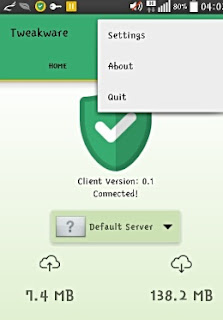
Here i introduce to you TweakWare: Most folks are familiar with this app, the mobile version is unlimited while the PC version is not : you get to use the demo for a limited time Then you will be prompt to get the premium version. So i prefer you use the unlimited mobile version on your android phone.

How To Use TweakWare On Etisalat NG On Android Phone
1. I assumed that we all have active Etisalat SocialMe, Smart or Chatpak. If not, check out this #link for the codes to subscribe.
2. Now, download Tweakware for Android device from here,
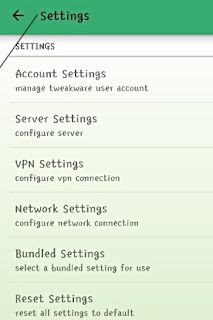
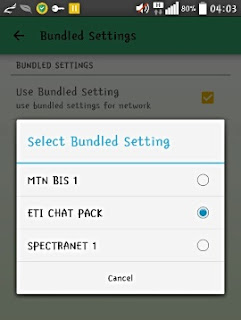
3. Launch the Tweakware and click Option, then Settings as it's show in the screenshot below

4. Scroll down to Bundle Settings and click on it
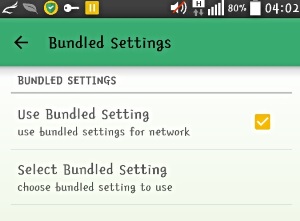
5. After you select the Bundle Settings, another window will appear and then tick Use Bundle Settingsand in select bundled settings click etisalat Chat Pack or MTN Bis depending on what  you are using.

Note: Just press back button and connect. Then experience ultra fast speed Both on Etisalat SocialMe and ChatPak! This TweakWare also work well on MTN Bis on android

Also Read:
Earn Money: Top 7 Best Apps That Pays Today
How To Make Your Android Battery Last 2-3 Days.
Hack Wifi Password Using Your Android Phone (2015)
How To Force 3G (WCDMA only) On Android Device In Simple Step

Never miss any of my future post CLICK HERE TO SUBSCRIBE Once entered, you will have to check your Inbox for a confirmation email containing a confirmation link. Once you VERIFY your email by clicking on the confirmation link in the message, you will never miss any future articles. 

Like US on Facebook Here

kindly share this by clicking on any of the share button below and also we love comment, should incase you have difficulty in doing this notify us in the comment box below.
Read More

Tuesday, 22 September 2015

Etisalat Unlimited Browsing Using OpenVpn On Andriod

13:22 0
Etisalat Ng has been one of well known mobile network due to their low tariff plan and has been so easy to tweak their data plan to surf free on the web using a vpn. You don't need to subscribe their huge data bundle plan just use this simple step to browse free unlimitedly using as liitle as N100.

How To use OpenVPN with Nigeria Etisalat Network on Android Devices
  • Firstly, you need to deactivate any active Chatpack on your etisalat SIM by dialing *343*5*0#
  • Then load N100 on your etisalat SIM and dial *200*3*3*2*1*1# (Ignore this if you have active Daily Etisalat Smartpak)
Note: please don't load on that sim again the plan is unlimited

Now the OpenVPN Configurations
1. Open Play Store on your phone and Search for OpenVPN Connect or Download it here
2. Download new OpenVPN Profile Settings here to your memory card.
3. Open your OpenVPN Connect, click on Options or Menu, you will see Import, click import, then import from SD card
4. Locate the Setting.ovpn that you downloaded and Select it

OpenVPN Connection Details
Username: vpnbook
Password: s6EdUrak

5. After you input the username and password, click on Save and Connect.
6. Once it connected just minimize it and start surfing unlimitedly.
Enjoy!

Also Read:
Earn Money: Top 7 Best Apps That Pays Today
How To Make Your Android Battery Last 2-3 Days.
Hack Wifi Password Using Your Android Phone (2015)
How To Force 3G (WCDMA only) On Android Device In Simple Step

Never miss any of my future post CLICK HERE TO SUBSCRIBE Once entered, you will have to check your Inbox for a confirmation email containing a confirmation link. Once you VERIFY your email by clicking on the confirmation link in the message, you will never miss any future articles. 

Like US on Facebook Here

kindly share this by clicking on any of the share button below and also we love comment, should incase you have difficulty in doing this notify us in the comment box below. 
Read More

Friday, 14 August 2015

Get Free N33,600 Worth of Airtime on your MTN Sim

12:08 0


This is to update my esteem viewer about this tricks and tips on how to flex this on thier line without stress, It just requires dialing of some code, but it's based on luck SIMs, it works for some MTN SIMs while refusing to work on other MTN SIMs. Just a game of luck.


Points to Note
» MTN New Sim is required
» You must have at least N30 airtime on the MTN to use
» Make sure you are on MTN iPulse or True Talk.

To Get Free N33,600 Airtime on your MTN SIM
» Simply dial *567*1# or *567*2# or *567*3#
Or use sms bomber and text;
» 10 to 567
» 20 to 567
» 30 to 567
Dial *559*4# to check your balance

If your SIM is among of luck SIMs, N10 or minimum of N30 will be deducted from your account and N33,600 worth of Airtime will be smile to you!, it will be valid for 7days, enjoy.

Also Read:  How To Make Your Android Battery Last 2-3 Days.

 Never miss any of my future post CLICK HERE TO SUBSCRIBE Once entered, you will have to check your Inbox for a confirmation email containing a confirmation link. Once you VERIFY your email by clicking on the confirmation link in the message, you will never miss any future articles.
Also follow on Facebook with our fan page Here

kindly share this by clicking on any of the share button bellow and also we love comment, should incase you have difficulty in doing this notify us in the comment box below.
Read More

Tuesday, 28 July 2015

Airtel NG Cut Down It Data Plan For As Low As 1k

00:16 0
The blackberry complete bundle that goes for N1400 per 3GB, Airtel has now reduced its price to N1000 for that same 3GB, it works on blackberry devices only.

 Airtel new plan

Is like Airtel doesn't want to be bias this time around. The previous plan of N1500 for 2GB plan has now upgraded to 3GB. This should be a better alternative to iPhone/iPad, Symbian and Windows phone users. Also good for Android phone users who find it tough to use the available tweak or change their imei. This plan is working for all types of phones and PC, but I can’t guarantee you the mercy deduction of the Megabytes.
To Subscribe
For Blackberry Device only 
» Load N1000 on your Airtel Sim and dial *440*1# for 3GB
» Valid for 30 days

For Other Devices 
» Load N1500 on your Airtel Sim and dial *440*16# for 3GB.
» Valid for 30 days

Why will you still go for Airtel Android Bundle of N2000 for 2GB when there is a better option.
Read More

Sunday, 5 July 2015

Get Free MTN N120,000 Min And 10GB To Call And Browse Unlimitedly

01:14 2
Hmmm! did i hear you say wow? well you can say that thousand times, because that was exactly what i say when it worked for me! without saying much just follow this procedure to get it done.


What You Need
  • MTN New Sim (That is never been used to receive any MB/GB)
  • Nokia Touch light or any Phone that can't browse
How To Activate
  • Insert MTN New Sim in any of the stated phone above
  • Text GM1000 to 131 on a New sim 
Method 2
well you can use this method to get Mtn 10GB data Free and also 120k free minute
  1. Dial *123*2*5*1# for #120,000 + 10Gig only on new sim
  2. Also*112# for 70gb
Dial *559# for balance

Walla! its that simple. You should receive the message above in the screenshot if it work for you

NB: This is exclusively for Techpill.net visitor, you can't find it else where!


Never miss any of my future post CLICK HERE TO SUBSCRIBE Once entered, you will have to check your Inbox for a confirmation email containing a confirmation link. Once you VERIFY your email by clicking on the confirmation link in the message, you will never miss any future articles.
Also follow on Facebook with our fan page Here

kindly share this by clicking on any of the share button below and also we love comment, should incase you have difficulty in doing this notify us in the comment box below.
Read More

Get Mtn Free 7.5Gigabytes Now (No Tweak Needed)

00:26 0
Wow its my pleasure to introduce this wonderful cheat to you from MTN Where you get 7.5Gb on your sim to browse on all platform be it pc or mobile. The procedure is simple you dont need to tweak your IMEI. just follow the procedure below


What You Need 
  • MTN New Sim (That is never been used to receive any MB/GB)
  • Nokia Touch light or old small Tecno phone
Here is how it works
  • Insert MTN New Sim in any of the stated phone above
  • Text 101 to 131
So simply as that, if your sim work for it, you should receive a successful message as shown in the above screenshot.

To check your Gigabytes balance and the validity date, text 2 to 131
Enjoy it while it last.


Never miss any of my future post CLICK HERE TO SUBSCRIBE Once entered, you will have to check your Inbox for a confirmation email containing a confirmation link. Once you VERIFY your email by clicking on the confirmation link in the message, you will never miss any future articles.
Also follow on Facebook with our fan page Here

kindly share this by clicking on any of the share button below and also we love comment, should incase you have difficulty in doing this notify us in the comment box below.
Read More

Sunday, 28 June 2015

Browse Free On MTN With N0.00

01:12 0
Browse free with N0.00 on your phone, pc and any other gadget with zero amount. Naij.com, an online news site, is helping to bring free mobile internet to Nigerians via the MTN network and the Opera software application. MTN users will be able to activate their free day of internet through Opera Mini on the MTN network. Which means you have access to browse for free with N0.00. No subscription or tweak required. What you need is to follow steps below accordingly and you are good to enjoying free Mtn browsing on your Smartphones or PC.


To Activate Your Free Browsing
1. Visit www.opera.com/mobile/mini to download the latest Opera Mini web browser or get it from Play Store Here 
2. With your Opera Mini visit http://webpass.opera.com/
Then you can start enjoying your free browsing.

To Make it Work With all Apps
That one will involve tweak 

1. Download SimpleServer Android version here
2. Create a new APN settings on your phone as follows.
» Proxy: 127.0.0.1
» Port: 8080
» APN: web.gprs.mtnnigeria.net
» Save And Activate it as your default settings

Configure Your SimpleServer as Follow:
» Pproxy host: 10.199.212.2
» Proxy Port: 8080
» Injection Method: get
» Injection querry/url: http://server4.operamini.com
» Injection Host: server4.operamini.com
» Injection line: press your enter key 4times
» Log level: debug4.

Close the settings and click the connect button.
Use Auto proxy to power all apps

How To Use it on PC Via SimpleServer
1. Download SS PC version here
2. Extract the zip file to a new folder on your desktop background.
3. Open SimpleServer.ini and set it as follow;

LHOST = '127.0.0.1'
IMETHOD = 0
ISPLIT = 0
RHTTP = 0
TIMEOUT = 60
PHOST = '010.199.212.002'
RQUERY = ''
RPATH = 0
PTYPE = 0
KEEP = ''
BQUERY = ''
MQUERY = ''
RHTTPS = 1
PPORT = 8080
LPORT = 8080
VALHDR0 = 'server4.operamini.com'
VALHDR1 = ''
VALHDR2 = ''
VALHDR3 = ''
IQUERY = 'server4.operamini.com'
ADMODE = 0
CQUERY = ''
CUSHDR2 = ''
CUSHDR3 = ''
CUSHDR0 = 'Proxy'
CUSHDR1 = ''
ILINE = 0
FQUERY = ''
SBUFF = 1024
RPORT = 0

4. Save the file and RUN SimpleServer.exe

Caution: It is advisable to use it with N0.00, otherwise MTN may wipe your credit balance.

Never miss any of my future post CLICK HERE TO SUBSCRIBE Once entered, you will have to check your Inbox for a confirmation email containing a confirmation link. Once you VERIFY your email by clicking on the confirmation link in the message, you will never miss any future articles.
Also follow on Facebook with our fan page Here

kindly share this by clicking on any of the share button below and also we love comment, should incase you have difficulty in doing this notify us in the comment box below.
Read More

Monday, 15 June 2015

Get Etisalat Unlimited Package To Browse And Download Free

11:20 2
Etisalat network have launch yet unspeakable and unbelievable unlimited packages where you can browse and download unlimidedly But there are few stuff you need to know before using this tricks. Etisalat are known to have full download speed in most areas this days compare to before where they crawl like snail. This Package is mainly for Browsing and downloading files. Just follow this procedure and get it done.


HOW TO SETUP YOUR SIM FOR THE UNLIMITED PACKAGE


1. Etisalat simcard, preferably i recommend you get easycliq if wish to migrate to easycliq dial*244*1#* Dial this code.
2. Then Dial *229*5*7# wait till you receive a message like this “you are on the etisalat paygo pulse browsing will attract N15 per 5min”
3. Once you receive the message, go ahead and load N100 airtime and you will be given 5mb
4. Just power on your browser and without mercy start downloading. Exactly 55min your connection will stop just disconnect and connect to enjoy back.
5. Your N100 will not be touched you can also use*228# to check your data balance all you should see there is 0.48mb


Also Read: Get MTN Unlimited Free Night Browsing

NOTE: For no reason don’t open the following; 2go, YouTube or any streaming website be it audio/video

IF I MISTAKINGLY VISIT A STREAMING SITE WHAT SHOULD I DO ?

Once you enter any streaming website,you also will know because Etisalat will start to send you multiple message. And, your 0.48mb is gone We all know etisalat do give free mb for just 1week so once they deduct it through the aid of streaming website, But, you can still browse unlimited for just one day with just 5# follow my steps below

==> Dail *229*5*7# and wait for the message i posted earlier

==> Then, Load your N100 and dial this code*330*1# you will be given 1Mb for one day

Power up your browsers.Once you mistakenly visit streaming website again, dial *330*2# to opt-out then,opt in again with *330*1#


Also Read: Make Free MTN Calls From 5AM To 8AM Daily

 FOR SUPPORT? CLICK HERE! 

Never miss any of my future post CLICK HERE TO SUBSCRIBE Once entered, you will have to check your Inbox for a confirmation email containing a confirmation link. Once you VERIFY your email by clicking on the confirmation link in the message, you will never miss any future articles.
Also follow on Facebook with our fan page Here

kindly share this by clicking on any of the share button below and also we love comment, should incase you have difficulty in doing this notify us in the comment box below.
Read More

Post Top Ad