Techpill - Tech Tips, News And More: Andriod

Hot

Post Top Ad

Showing posts with label Andriod. Show all posts

Saturday, 31 December 2016

Download PES 2016 ISO PSP On Your Andriod

16:23 203

This to inform you that the PES 2016 ISO psp version is now available for you to play on your android phone. if you have been enjoying the previous version of pes 2015 iso here is an update for you. Pes 2016 need no introduction because most folks already know the usefulness of this football game. So i will not waste your time bring up long post for you to read. Here is the straight forward step to get it down on your android device.


incoming search terms:
 pes 2016 apk
 pes 2016 android
  pes 2016 iso
  pes 2016 psp
  PES 2016 PSP iso
  pes 2016 iso psp
  download pes 2016 psp
  pes 2016 crack
  pes 2016 ppsspp iso


New Feature
+  Some Club has been updated Jersey from 2015 to 2016.
+  New Boots Adidas Pack.
+  Fix Jersey number of BPL ( Barclays Premier League ) invisible.
+  And many others including the latest addition of skill players, etc.
Materials Needed
Update: Use link #3 if you are having issue with link #1 and link #2

Link #3 this link contain a Pes 2014 iso modded and updated to PES 2016 version, you will see a pes2014 data but it actually modded with PES 2016 features, Any player you didn't find in the current club kindly get them in the transfer window. It require you to unzip, after unziping to a folder on your phone, then follow step 2 and 4 below.

Also Read: Download PES 2017 ISO PSP On Your Android

How to Install PES 2016 ISO Version On Android Device
1. Download PES 2016 ISO Data from the link above 
2. Download and Install PPSSPP Gold from the above link
3. Move PES2016.iso that you downloaded to SDCard >> PSP >> GAME
4. Open PPSSPP Gold that you installed and Find Games, then tap PES2016
Now you can start Play the game, and enjoy!

Also Read: How To Activate Multiplayer Mode On PES 2016 ISO PSP On Android

Also READ: Top 6 Amazing Things You Can Do On Andriod Using OTG Cable


Also Read:  Download Grand Theft Auto SanAndreas v1.08 Apk + Data + Patch

Never miss any of my future post CLICK HERE TO SUBSCRIBE Once entered, you will have to check your Inbox for a confirmation email containing a confirmation link. Once you VERIFY your email by clicking on the confirmation link in the message, you will never miss any future articles.

Image result for facebook like
kindly share this by clicking on any of the share button below and also we love comment, should incase you have difficulty in doing this notify us in the comment box below.
Read More

Thursday, 29 December 2016

Download Official PES 2017 Apk And Data On Your Android Phone.

15:16 1
Hello football lover, the pes 2017 apk and pes 2017 data is now officially available for you to download on your Android device, pes 2017 data with the pes 2017 apk. So if you you have been  having issue with blank screen with the pes 2017 iso version. Here is an official PES 2017 android version for you.

Download pes 2017 apk, download pes 2017 data, download pes 2017 for android,

What you need to know about the pes 2017 apk and data

  • Its 1GB large.
  • Its required Internet connection before you can play.
  • Great graphics.
  • Many more cool features.

How To Install PES 2017 For Android Apk

  1. Download and Install the Google play games on your Android.
  2. Then download the PES 2017 apk and data directly from Google playstore or 
  3. Download PES 2017 apk here (26MB) and download PES 2017 data here. (1GB)


  4. After downloading, unzip and move the data file to "Internal Storage/Android/obb” folder

After that launched the apk you downloaded, it will automatically sync the data you moved earlier on. Happy playing friends.
Read More

Monday, 12 September 2016

Download PES 2017 ISO PSP On Your Android

20:32 110
Enjoy this new PES 2017 iso on your android phone, if you are not familiar with Pro Evolution soccer game, then you are new in gaming. This wonderful Pes 2017 iso is packed with new features which will be alighted below.

PES 2017 Apk Data

If you have been enjoying the PES 2016 iso, here is a new PES 2017 iso download for you to enjoy on your android phone.

incoming search terms:

pes 2017 apk
pes 2017 android
pes 2017 iso
pes 2017 psp
PES 2017 PSP iso
pes 2017 iso psp
download pes 2017 psp
pes 2017 crack
pes 2017 ppsspp iso

Download PES 2017 iso Android Apk Data

What's new on PES 2017 iso:

  • Enhanced passing
  • Genuine touch ball control 
  • Enhanced objective tending methods
  • Superb graphics
  • Team update and many more..

Materials Needed

1. PSP Emulator: Download PPSSPP Gold (playstore)
2. PSP Emulator: Downlod PPSSPP GOLD (Free)


       3. PES 2017 ISO Data Link (483.14MB)
The password is: www.techpill.net

Update: Download Official PES 2017 Apk and Data Here. If you are having blank screen issue, pls download PES 2017 official version.


How to Install PES 2017 ISO Version On Android Device


1. Download PES 2017 ISO Data from the link above
2. Download and Install PPSSPP Gold from the above link
3. Unzip the pes 2017 iso data you with Winrar or any unzipping app, you will see the iso data inside after unzipping.
3. Move PES2017.iso that you found after unzipping to SDCard >> PSP >> GAME
4. Open PPSSPP Gold that you installed and Find Games, then tap PES2017
Now you can start Play the game, and enjoy


Also Read: Download PES 2016 ISO PSP On Your Andriod

Never miss any of my future post CLICK HERE TO SUBSCRIBE Once entered, you will have to check your Inbox for a confirmation email containing a confirmation link. Once you VERIFY your email by clicking on the confirmation link in the message, you will never miss any future articles.
Image result for facebook like
kindly share this by clicking on any of the share button below and also we love comment, should incase you have difficulty in doing this notify us in the comment box below.
Read More

Monday, 22 February 2016

New Way To Run Multiple Accounts On All Application And Game

12:44 0
This are for folks who operate different accounts either for personal or business use, Therefore needs to login into those accounts without need of login out and re login with the other ones arises, Even with most phones that come with dual sim, This apps will save you from all those stress.


Parallel Space multiple account

Not just running more than one account on Instagram, Facebook or WhatsApp but ability to log in to all the account at the same time without needing to log out of one before login in the other.

Meet Parallel Space is a unique app which allows you to sign in two different Facebook accounts simultaneously on a single Android device.

Why You Should Use Parallel Space Multiple Account?
 Parallel Space is the only app in Google Play which allows you to run multiple accounts simultaneously

>> Powerful yet tiny: As small as 2MB.
>>Facebook: Connect different friends with second Facebook account
>> Instagram: Share different photos with second Instagram account
>>Games: Play two accounts at the same time and double up the fun!
>>Parallel Space supports 99%+ apps in Google Play, explore it by yourself now!

NOTE: The only downside of this app is that it drain battery but i'm sure the Developer is working on that issue.

You can download it on Google playstore Here
 
Read More

Tuesday, 16 February 2016

How To Download And Install Grand Theft Auto- Liberty City Stories Data + apk

11:40 1
Wow i'm glad to announce that a new Grand Theft Auto- Liberty City Stories! Android version Which is available in the Google Play Store for $3.99 has been release for all game lovers all around the world.


Grand Theft Auto- Liberty City Stories cracked android apk

In Liberty City Stories, you get to play Toni Cipriani, Former trusted wise guy for the Leone family, Toni Cipriani returns home to Liberty City after spending time in hiding for killing a made man. Now, the streets of Liberty City are in turmoil, as warring families vie for control and the town begins to self-destruct under waves of political corruption, organized crime, drug trafficking and union strikes. Deranged hit men, morally depraved tycoons, cynical politicians and even his own mother stand in the way as Toni tries to bring the city under Leone family control.

Grand Theft Auto- Liberty City Stories for android


Relax! i know lot of folks is wondering where to get the cracked free Grand Theft Auto- Liberty City Stories version. Don't worry Grand Theft Auto cracked- Liberty City Stories is here so don't look further.

New Feature of Grand Theft Auto- Liberty City Stories
  •  New high resolution textures and character art
  • Real time lighting and shadows
  •  Enhanced draw distance
  • Rebalanced controls for touch-based gaming
  • Cross-platform cloud saves via the Rockstar Social Club
  • Physical controller support  
  • and more...
 Procedure
1. unzip the archive folder
2. You should see com.rockstargames.gtalcs
3. move it to  / sdcard / Android / obb /
So you should get /sdcard/Android/obb/com.rockstargames.gtalcs/
4. Install apk, run the game!

Download links
Grand Theft Auto- Liberty City Stories Data ( Obb or archive) Link #link 1 here or Link #2 Here
Grand Theft Auto- Liberty City Stories Apk Link #1 Here Or Link #2 Here
 NOTE: Both link #1 and #2 is active, so which ever one you prefer.

Also Read: Download Grand Theft Auto SanAndreas v1.08 Apk + Data + Patch

Kindly share this: Let your friends know what you have just read by using the share button below.


Never miss any of my future post CLICK HERE TO SUBSCRIBE Once entered, you will have to check your Inbox for a confirmation email containing a confirmation link. Once you VERIFY your email by clicking on the confirmation link in the message, you will never miss any future articles.  
Like US on Facebook Here
Read More

Tuesday, 5 January 2016

Full List Of Devices To Get Android 6.0 Marshmallow: Check If Your Android Device Is Included Here

17:53 0

Android  is the #1 OS in the world today, not only because its owned and manage by google, but because of it flexibility, easy to navigate and most of all it beauty! When the Android 4.4.4 Kitkat came we all wanted it, then google releases another updated version Android 5.0 lollipop which most of us are enjoying today.

Android 6.0 marshmallow download

Of recent Google releases the most amazing android 6.0 named Marshmallow, some of us has been enjoying this new feature, and most of us can't really wait for it to be available on our devices. Just to clear the air, if you don't really know if your devices will get this updates here are the list of most of the device that will get the Android 6.0 Marshmallow. If you didn't see your phone, it means you might not get the updates.

Samsung
2015
Samsung Galaxy S6 edge+
Samsung Galaxy Note5
Samsung Galaxy S6 edge
Samsung Galaxy S6
Samsung Galaxy Tab S2
2014
Samsung Galaxy Note 4
Samsung Galaxy S5
Samsung Galaxy Alpha
Samsung Galaxy A8
Samsung Galaxy A7

Sony
2015
Sony Xperia Z5 Premium
Sony Xperia Z5
Sony Xperia Z5 Compact
Sony Xperia Z3+ / Z4
Sony Xperia C5 Ultra
Sony Xperia C4
Sony Xperia M5
Sony Xperia M4 Aqua

2014
Sony Xperia Z3 / Z3v
Sony Xperia Z3 Compact
Sony Xperia Z3 Tablet Compact
Sony Xperia Z2
Sony Xperia Z2 Tablet

2013
Sony Xperia Z Ultra GPE

LG
2015
LG V10
LG G4
LG G Flex2
LG G4 Stylo

2014
LG G3

HTC
2015
HTC One M9 Plus
HTC One E9 Plus
HTC One M9
HTC One E9
HTC One ME
HTC Butterfly 3
HTC Desire 826

2014
HTC One (M8)
HTC One (E8)
HTC One (M8 Eye)
HTC Desire 820
HTC Desire 816

Motorola
2015
Motorola Moto X Pure Edition (3rd gen)
Motorola Moto X Style (3rd gen)
Motorola Moto X Play
Motorola Moto G (3rd gen)

2014
Motorola Moto X Pure edition (2nd gen)
Motorola DROID Turbo
Motorola Moto MAXX
Motorola Moto Turbo

Xiaomi
2015
Xiaomi Mi Note 2
Xiaomi Redmi 2
Xiaomi Redmi 2 Prime
Xiaomi Mi 4i

2014
Xiaomi Mi 4
Xiaomi Mi Note
Xiaomi Mi Note Pro


Huawei
2015
Huawei Ascend P8
Huawei Ascend P8max
Huawei Honor 6 Plus
Huawei Honor 7i
Huawei Honor 7
Huawei Mate S
Huawei MediaPad X2
Huawei Ascend G8

2014
Huawei Mate 7
Huawei Honor 6
Huawei Mate 7
Huawei Honor 4X
Huawei Honor 4C
Huawei Ascend G7

Lenovo
2015
Lenovo K3 Note
Lenovo A7000
Lenovo A7000 Plus
Lenovo Vibe S1
Lenovo Vibe P1

Asus
2015
Asus Zenfone 2 series
Asus Zenfone 2 Laser
Asus Zenfone 2 Deluxe
Asus Zenfone Selfie
Asus Zenfone Go

2013
Padfone S

OnePlus
2014
OnePlus 2
2014
OnePlus One

Android One
2015
Micromax Canvas A1
Karbonn Sparkle V
Spice Dream Uno
Symphony Roar A50
Cherry Mobile One
MyPhone Uno
Mito Impact A10
Nexian JOurney One


BlackBerry
2015

BlackBerry Priv

ZUK
2015
ZUK Z1

Nvidia
2015
Nvidia Shield Tablet K1

Tecno
Tecno Camon C8
Phantom 5

Kindly Share This: Let your friends know what you have just read, any comment? please use the comment box below

Never miss any of my future post CLICK HERE TO SUBSCRIBE Once entered, you will have to check your Inbox for a confirmation email containing a confirmation link. Once you VERIFY your email by clicking on the confirmation link in the message, you will never miss any future articles.  

Like US on Facebook Here

Read More

Wednesday, 30 December 2015

Easy Method To Root infinix Note 2 X600 And Gionee M3 mini

12:14 0
Rooting Infinix Note 2 X600 and Gionee M3 mini has been a pain in the neck for it users, most folks find it difficult to root this devices because of it stubborn nature, most of the popular rooting apps like kingroot, tecno root, kingo root, etc. don't work with this two phones. Now i bring to you straight method to root infinix Note 2 X600 and gionee M3 mini

how root infinix note 2 or how to root gionee m3 mini
.
Without wasting much of your time here is the working method to root Gionee M3 mini and infinix Note 2 X600, just follow this simple steps below to get it done with no stress.

Advice: please it is advisable to unroot it befor you can perform an OTA updates from the Phone manufacturer. Here is a simple post to Unroot Any Android device

What You Need
» PC with internet connection
» USB Cable
» SP Flash Tool - Download it Here
» SuperSU.zip - Download it Here
» For Infinix Note 2, download Ported TWRP by Team Hovatek - Download it Here
» For Gionee M3 Mini, download Ported TWRP by Team Hovatek - Download it Here

Procedure
» Save the SuperSU.zip that you downloaded to your phone's SD card
» Unzip the TWRP zip file that you downloaded and flash the recovery image to the phone using SP Flash Tool
» Now, boot your phone into TWRP Recovery Mode (by Holding the Vol Up and Power button simultaneously for 5 seconds)
» In TWRP Recovery, Choose install zip from SD card - to choose a zip from SD card use Vol up and down scroll up and down, then choose the Supersu.zip file from the root of your SD card.
Scroll to yes and install, after a successful flashing go back and reboot.
That's all. you can download root checker from google playstore to confirm when done.

Also Read:
How to Unroot An Android Device In Simple Step

Universal Method For Changing Any Android IMEI to BB IMEI Plus HTC Tweak


Never miss any of my future post CLICK HERE TO SUBSCRIBE Once entered, you will have to check your Inbox for a confirmation email containing a confirmation link. Once you VERIFY your email by clicking on the confirmation link in the message, you will never miss any future articles.


kindly share this by clicking on any of the share button below and also we love comment, should incase you have difficulty in doing this notify us in the comment box below.

Read More

Sunday, 1 November 2015

Best Way To Increase Internal Space On Any Android Device

14:30 2
How to fix low memory issues on your android phone? Do you see this annoying pop up on your phone telling you you have got low memory on your android device? where are all the memory gone, knowing fully well that you still have enough space when you check the memory usage using in built app or external apps. Well this is a quick solution to fix low memory on Android phone. You wouldn't have to worry about this warning when trying to utilize your phone space again.

Ensure You have the following in place
<> A rooted android phone
<> Make sure you have ES Explorer if you don't have it download it Here

How To Increase Android Internal Space
<> Open ES Explorer navigate to Root Folder >>then click on Data


<> Then go to log_other_mode


<> Make sure you delete all the file there as seen i below image.


<> Reboot your android device, you see a noticeable boost of memory

NOTE: This doesn't affect your phone in anyway, it will only free up your phone memory been occupied by invisible junks you don't need.

Also Read: HTC One A9 vs Iphone 6S H2H Comparison

Also Read:
Ultra Fast Etisalat Unlimited Free Browsing Using Tweakshare
Earn Money: Top 7 Best Apps That Pays Today
How To Make Your Android Battery Last 2-3 Days.
Hack Wifi Password Using Your Android Phone (2015)
How To Force 3G (WCDMA only) On Android Device In Simple Step

Never miss any of my future post CLICK HERE TO SUBSCRIBE Once entered, you will have to check your Inbox for a confirmation email containing a confirmation link. Once you VERIFY your email by clicking on the confirmation link in the message, you will never miss any future articles. 

Like US on Facebook Here

kindly share this by clicking on any of the share button below and also we love comment, Let us know what you feel about the phone in the comment box below.
Read More

Wednesday, 28 October 2015

Tecno Camon C8: How To Root And Change IMEI

22:02 2
Camon C8 has been one of the recent Tecno releases, its 13MP makes it a comparison to some Powerful android devices, Which is it major selling point especially in Africa Countries.


Rooting Tecno Camon C8 has been a pain in the neck for all the users of this Android phone, Most well known apps for rooting e,g kingroot, framaroot, rootGenius all fail to root this stubborn device. Well i wouldn't want to bore you with spec of this phone, which i think you already know, But here to give you the working method to root Tecno Camon C8. Follow this steps by step Guide to get it done with ease.

What You Need
<> USB cable
<> PC with Internet Connection
<> SP Flash Tool- Download it Here
<> SuperSu Zip- Download it Here
<> TWRP for Tecno C8 by Team Hovatek - Download it Here

How To Root Tecno Camon C8
<> Save the SuperSU.zip that you downloaded to your phone's SD card
<> Unzip the TWRP zip file that you downloaded and flash the recovery image to the phone using SP Flash Tool or ADB
<> Now, boot your phone into TWRP Recovery Mode (by Holding the Vol Up and Power button simultaneously for 5 seconds)
<> In TWRP Recovery, Choose install zip from SD card - to choose a zip from SD card use Vol up and down scroll up and down, then choose the Supersu.zip file from the root of your SD card.
Scroll to yes and install, after a successful flashing go back and reboot.
Cool isn't it? Your Camon C8 is now successfully Rooted!

How To Change Tecno Camon C8 IMEI
To change the imei just go to the universal method Here

Earn Money: Top 7 Best Apps That Pays Today
How To Make Your Android Battery Last 2-3 Days.
Hack Wifi Password Using Your Android Phone (2015)
How To Force 3G (WCDMA only) On Android Device In Simple Step

Never miss any of my future post CLICK HERE TO SUBSCRIBE Once entered, you will have to check your Inbox for a confirmation email containing a confirmation link. Once you VERIFY your email by clicking on the confirmation link in the message, you will never miss any future articles. 

Like US on Facebook Click Here

kindly share this by clicking on any of the share button below and also we love comment, should incase you have difficulty in doing this notify us in the comment box below
Read More

Tuesday, 27 October 2015

MTN Unlimited Free Browsing With Just N100

15:52 0
Why waste your money when you can browse free and download unlimtedly on pc and on your andriod phone? Thats exact word i told aisha my neigbour. 

Aisha is a movies freak, she love streaming YouTube video all day with her PC and most times on her HTC one x device. I use to see her smiling gazing at her phone, i begin to wonder whats so interesting about her phone. Well until i approach her about it and she explains that she watches most latest movies on a site online and sometimes she download some of them. I was forced to ask her how much she spend on Megabyte she told me N2,000 for two days. That's so alarming! just do the mathematics for a month and see how much aisha spend just to stream and download videos online for a month.


With this trick you can only spend just N100 to download and surf unlimited on android and PC for a day, or any day you feel like downloading or surfing and once the day is over resubscribe again. Its super fast on both mobile and PC. follow the following steps and get it done correctly. Its easy!

NOTE: This is the working MTN BIS BBM tricks that work flawlessly, That's what i'm using to post this now. The speed is ultra fast.

How To Browse Unlimited On MTN With N100
>> First subscribe with MTN daily bbm subscription text BBMIDID to 21600
>> N100 will be deducted then you good to go to the set up below

How To Configure It On Android
» Download Android SimpleServer Here. when ask for password input www.techpill.net
» Install it on your Android Device

Create New APN settings On Your Phone As Follows:
» Proxy: 127.0.0.1
» Port: 8080
» APN: web.gprs.mtnnigeria.net
» Save And Activate it as your default settings.

Open SimpleServer and Configure the Settings as follow:
» Pproxy host: 10.199.212.2
» Proxy Port: 8080
» Injection Method: get
» Injection querry/url: http://web.blackberry.com
» Injection Host: web.blackberry.com
» Injection line: press your enter key 4 times
» Log leve: debug
» Close the settings and click the connect button.

How To Configure It On Pc
For PC Users To Use Mtn Bis Via SimpleServer» Download and extract SS by techpill to a new folder on your desktop background. when ask for password just put www.techpill.net

Connect Your Modem With:
» APN: web.gprs.mtnnigeria.net.
» Proxy: leave it empty
» Port: leave it empty

» Open the file you extracted, double-click "SimpleServer.exe"and make sure is always on open. by minimizing it. please make sure its the file with the highest megabyte you open.
» Configure your Browsers and IDM to 127.0.0.1 Port 8080
» Remember to tick: Use this proxy server for all protocols
» Start surfing and downloading with Mtn Bis Subscription.
Enjoy super fast MTN unlimited Browsing with just N100.

Earn Money: Top 7 Best Apps That Pays Today
How To Make Your Android Battery Last 2-3 Days.
Hack Wifi Password Using Your Android Phone (2015)
How To Force 3G (WCDMA only) On Android Device In Simple Step

Never miss any of my future post CLICK HERE TO SUBSCRIBE Once entered, you will have to check your Inbox for a confirmation email containing a confirmation link. Once you VERIFY your email by clicking on the confirmation link in the message, you will never miss any future articles. 

Like US on Facebook Click Here

kindly share this by clicking on any of the share button below and also we love comment, should incase you have difficulty in doing this notify us in the comment box below
Read More

Saturday, 24 October 2015

Modern Way To Compress Large Video, File To Small Size On Android And PC

19:00 2
How To Compress Video, File To smaller size without losing it quality: You will Agree with me that there are various method on the web which does not even come close to working, though those that manage to work looses it quality at finish end.
I will not bore you with long words trying to tell you the benefits which some of us is already familiar with, here is a full and quality way to compress large video and file to smaller size without losing its original quality.

How To Compress Large Video, File On Android And PC
How To compress Video On Android
Android is the most use platform with it various premium quality apps coming up daily. here is a wonderful apps to compress large video on android with ease. Its called Video compressor, you can download it on Playstore HERE


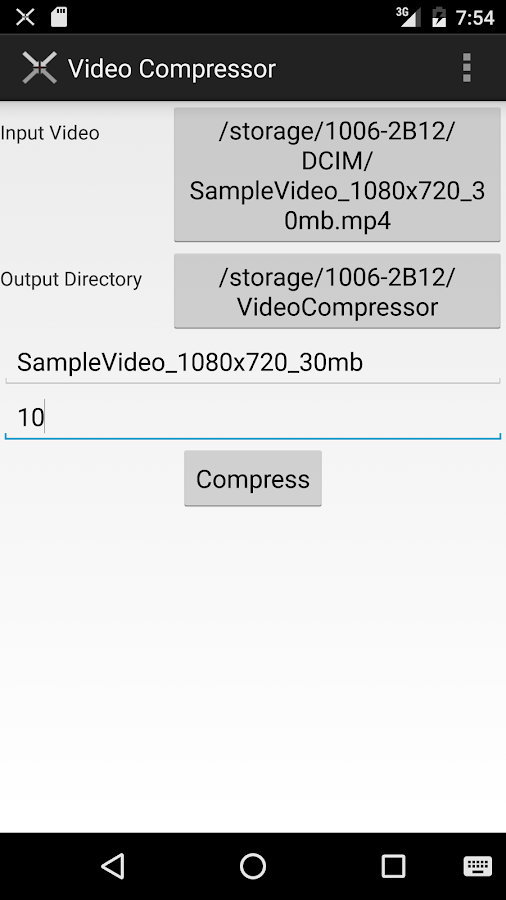
   Video Compressor- screenshot

> Open the apps after installation, you will see Input Video click on it and select the video you want to compress
> Then right after that you will also see output Directory select and choose where you want to store your video. either on Phone or SD Card.
> Click on Compress Button. wait and relax for few minute, walla! your video is successfully compressed.

How To Compress Video On PC
Lots of method to compress video and file on PC but the method i think work best is the HandBrake Method, This method also allow you to compress large video without loosing it Quality. You can Download Handbrake HERE. One think about Handbrake is that it compress video From nearly any format, Its support all platform of PC.

> Just choose the video or File you want to compress and hit the Compress Button. That's All.

Have you use any of this before? or do you have any better one you have use to compress?kindly notify us in the Comment Box below

Also Read:
Download Files from YouTube, Facebook, Vimeo, VK.com In One 
Ultra Fast Etisalat Unlimited Free Browsing Using Tweakshare
Earn Money: Top 7 Best Apps That Pays Today
How To Make Your Android Battery Last 2-3 Days.
Hack Wifi Password Using Your Android Phone (2015)
How To Force 3G (WCDMA only) On Android Device In Simple Step

Never miss any of my future post CLICK HERE TO SUBSCRIBE Once entered, you will have to check your Inbox for a confirmation email containing a confirmation link. Once you VERIFY your email by clicking on the confirmation link in the message, you will never miss any future articles. 

Like US on Facebook Here

kindly share this by clicking on any of the share button below and also we love comment, should incase you have difficulty in doing this notify us in the comment box below

Read More

Post Top Ad